Hi, Timo here! I’ve written this guide here so you can help contribute to TOSS.
1. Blast Off!
Visit the admin page and sign in. Click “login with Netlify Identity”. For safety reasons the login details aren’t on this page (obviously). Go and ask the right people for it ;)
FIGURE 1.1 ↓
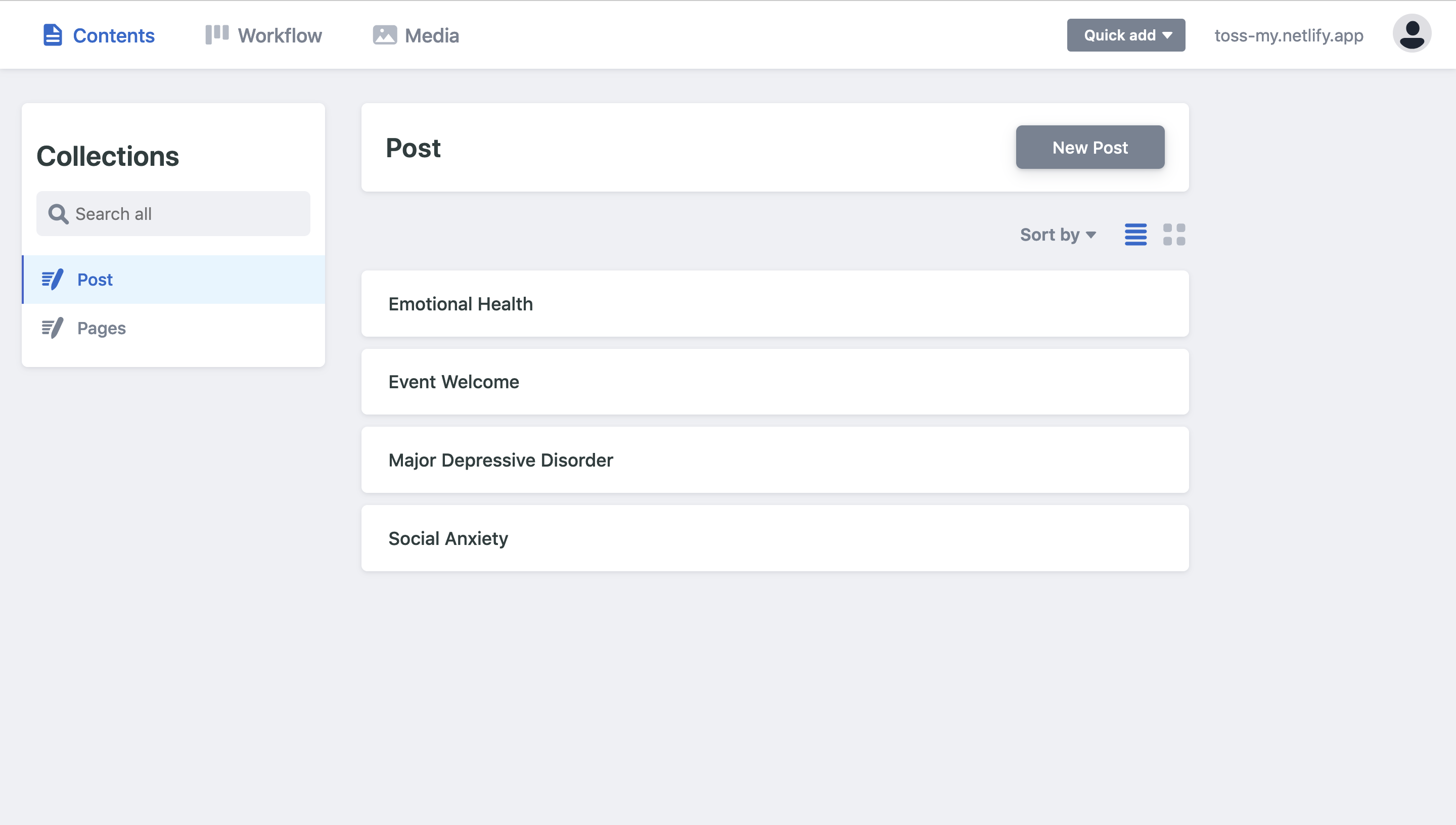
Welcome to Netlify CMS! CMS, short for Content Management System, is a page where authors edit their posts before publishing them to a blog. If you’ve written on Wordpress blogs before in the past, some of the features and words will sound fleetingly familiar to you.
Figure 1.1 shows what your homepage looks like. It displays a list of all the posts on the website, which are all editable. Now click ‘New Post’.
Fill in the initial details – I’ve included ample instructions on how not to go wrong. In the top menu you will find a setting to upload a cover image! See the image section of this post for more details.
IMPORTANT NOTICE! There’s been a bug recently– when you create a new article there might be some ‘required’ fields that need to be turned on and off a few times for good measure before being able to save a post.
FIGURE 1.2 ↓
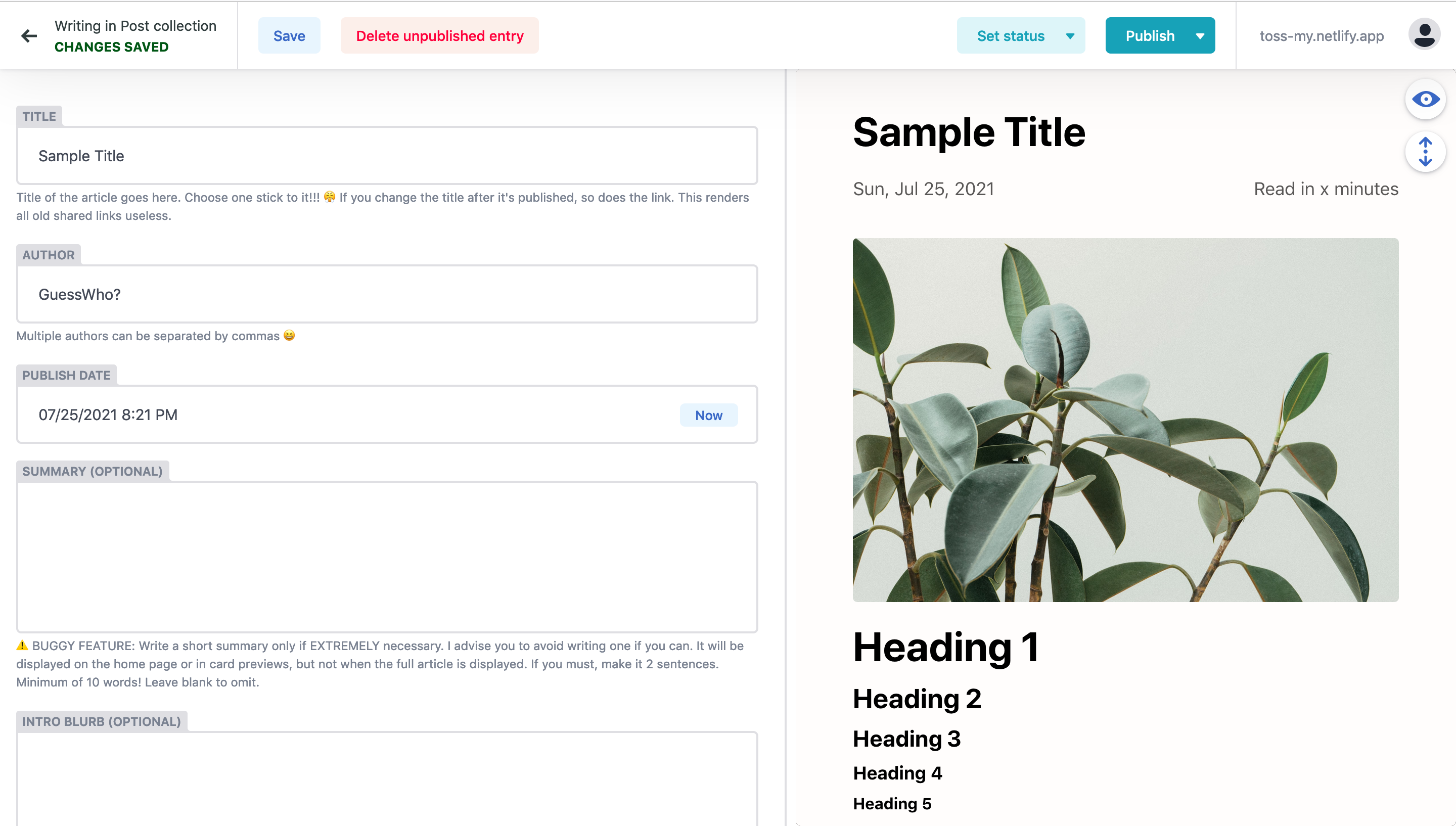
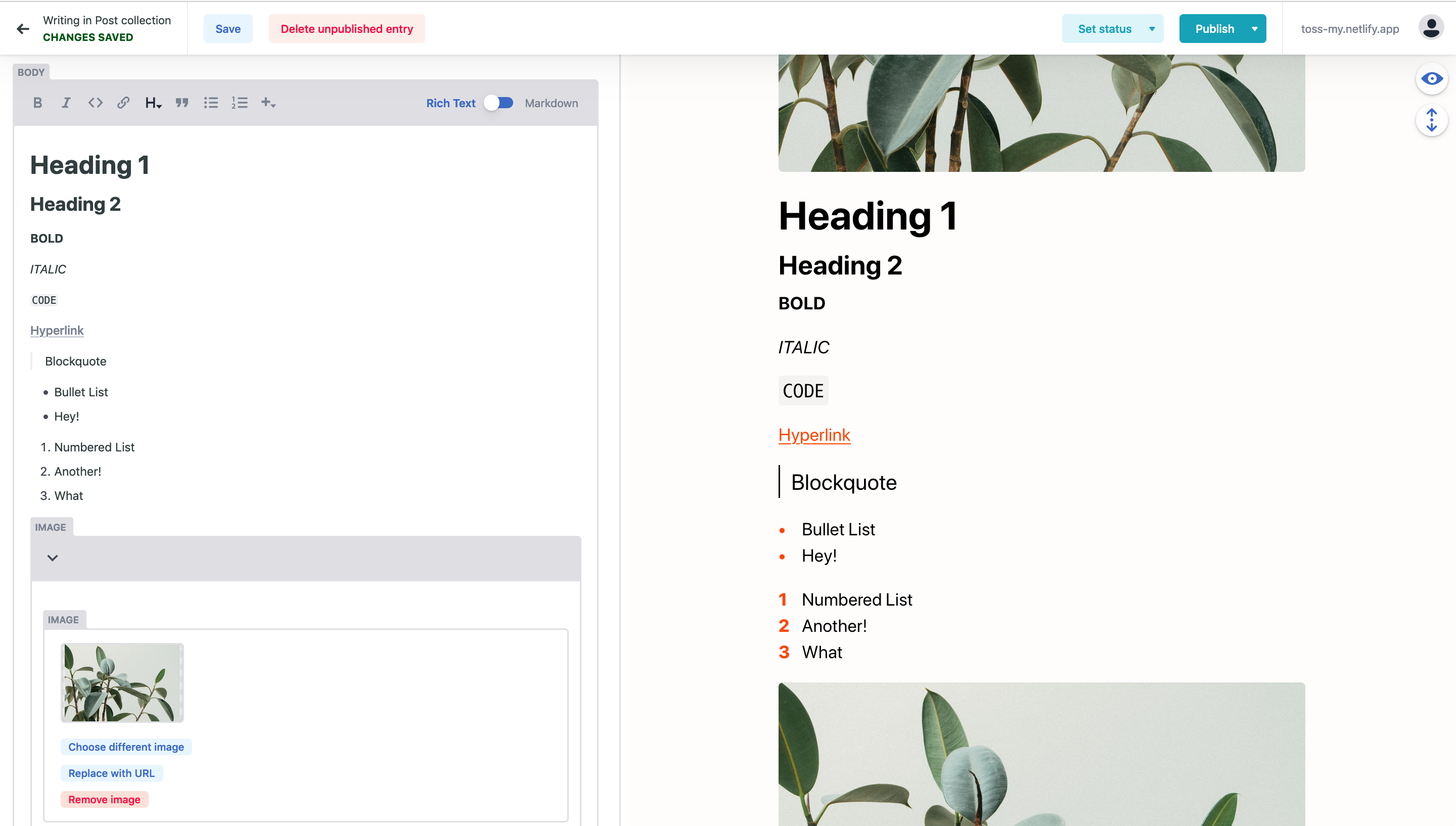
Scroll down to the Body Section as shown in Figure 1.2. You will find that the switch is flipped to ‘Rich Text’ mode (toggle it otherwise). This mode helps get pretty much everything done without getting too fussy into the technical details and code. Click around on the buttons and mess around! It should help you get accustomed to the features. Squint or zoom in onto Figure 1.3 for a glimpse of the features.
What’s Included:
- Bold and Italic styling
- Hyperlinks
- Set text size (Heading sizes included)
- Enable blockquotes (Quite similar to what you’d get in Notion)
- Bullet Lists and Number Lists
Please Note: For hyperlinks, please include the ‘https://www…’ in your link! Not doing so will cause the website to throw a 404 Not Found Error when you click it. I won’t be fixing this, see the final section to find out why.
When you’re done with your writing, hit ‘Publish Now’. Try to avoid ‘Publish and Create New’ or ‘Duplicate’ unless you really know what you’re doing.
It will take 2-3 minutes for the server to update. Be patient!
FIGURE 1.3 ↓
2. Postmaking – Things to note
Images
Images should be around to Full-HD resolution (1920 x 1080), which translates to a file size in the 200kB to 600kB range. This size strikes a good balance between quality and website loading times. Don’t include too many pictures per article –– that’ll slow the page down and make site visitors scroll a fair bit more than necessary.
You can find royalty-free illustration images on Unsplash, which are colour-graded for that svelte, high-production-level aesthetic. If you look carefully, you’ll see an option to download the photo from Unsplash at Medium resolution, which is perfect for the blog. You can always compress your own pictures using an image compressor online.
Don’t forget to write an alternative text description for accessibility. More on accessibility here.
Table of Contents
The table of contents is automatically generated based on occurrence of headers in the document. Try to reduce the number of Heading 1s used because they’re large and they compete too much with the main title. Don’t go too deep into headings either, just keep within Headings 2-4. Save Heading 6 for figure caption labels, just like what I’m doing!
Emojis
Emojis are supported, so feel free to use them! 🥳
Workflow
The ‘Set Status’ button can be found in the menu bar of the editor. This allows you to classify a post in either of the three stages:
- Drafts
- In Review
- Ready
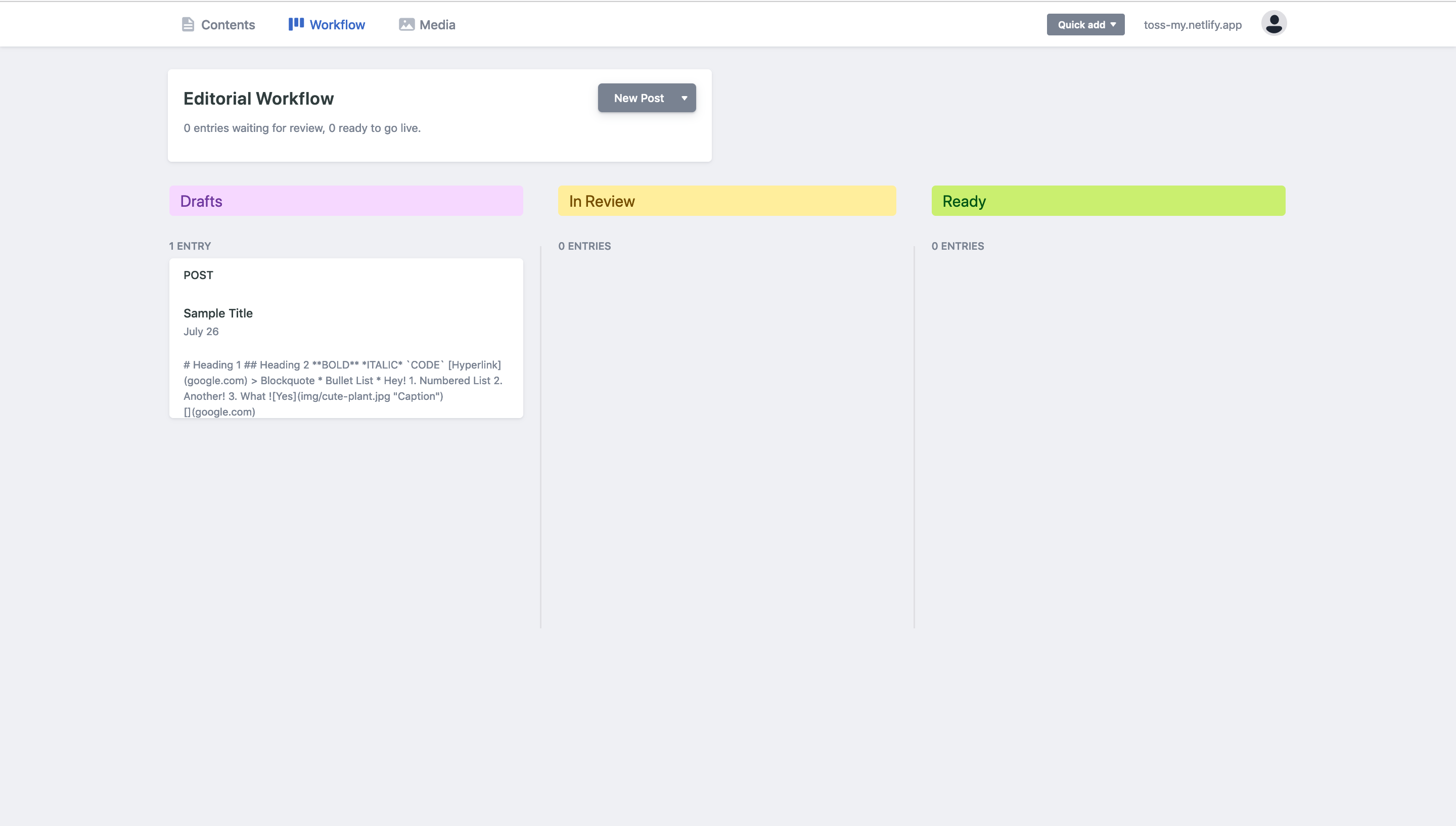
You will be able to see unpublished or unfinished posts in the Workflow tab of the CMS. See Figure 1.4.
Use the classification as a guide to help you plan your articles. Eventually, we could appoint an editor to check/vet the articles to transfer them from ‘In Review’ to ‘Ready’. For now, just do as you please – there’s no set way of doing anything.
FIGURE 1.4 ↓
3. Advanced Markdown Features
More creative power? Willing to dive down into the nitty-gritty? I appreciate your bravery – you will be rewarded with more privileges. Now, make sure you’re in the Body Editor, and flip the switch from Rich Text to Markdown – wait for it –
FIGURE 1.5 ↓
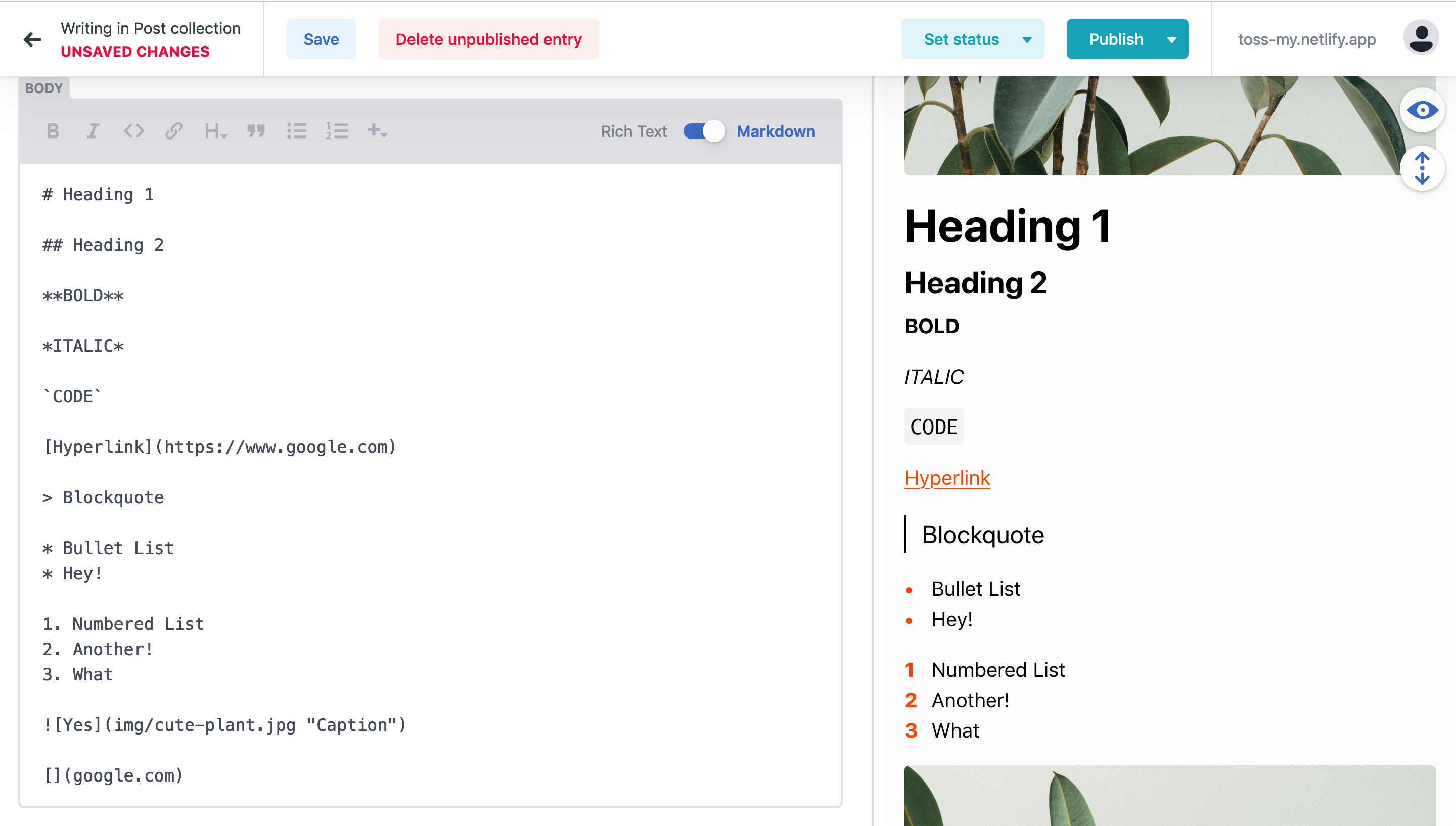
Boom! What you see here in Figure 1.5 is the Markdown syntax – a language that describes formatted text (for the whole blog). Look closely at how the body editor on the left corresponds to the preview on the right. You’ll see it’s some kind of a simple programming language which is easy to understand. The more curious ones can do some research here. Go ahead and play around with the code and experiment – the undo shortcut ctrl+z is your best friend! You can always switch back to Rich Text mode anytime.
Those with basic programming knowledge will get used to this rather quickly. (Cyn Thea, sorry you hate CS.) The following tutorials below only work when you switch to Markdown mode. Anyway, here goes…
Embed YouTube
Get your YouTube link and copy out the string of characters after the equals sign. This string is the video’s unique identifier which we can then sub into this shortcode.
{{< youtube {unique identifier} >}}
If you wanted to embed youtube.com/watch?v=3RWug92vtbE, you would do this:
{{< youtube 3RWug92vtbE >}}
Result:
(Thurston is a good boy.)
Tables
If you’ve seen some of the earlier posts you’ll find that I’ve included a nice table of telephone numbers and emails. You can create your own table by visiting a markdown table generator here– just fill in the blanks with words and select the formatting.
Or, you can always copy the exact same contact details and paste them into your article, which I’ve provided here…
| Name | Contact Method |
|---|---|
| Befrienders | 03-7956 8145 (24H KL Hotline) |
|  | 05-547 7933 (4pm-11pm Ipoh Hotline) |
|  | Email: sam@befrienders.org.my |
|  | Website: befrienders.org.my/ |
| Malaysian Mental Health Association | 03-2780 6803 |
|  | Email: admin@mmha.org.my |
|  | Website: mmha.org.my |
| Relate Malaysia | Email: info@relate.com.my |
|  | Website: relate.com.my |
| MIASA | 03-7932 1409 |
|  | 019-236 2423 |
|  | Email: miasa.malaysia@gmail.com |
|  | Website miasa.org.my |
…which nets you this:
| Name | Contact Method |
|---|---|
| Befrienders | 03-7956 8145 (24H KL Hotline) |
| 05-547 7933 (4pm-11pm Ipoh Hotline) | |
| Email: sam@befrienders.org.my | |
| Website: befrienders.org.my/ | |
| Malaysian Mental Health Association | 03-2780 6803 |
| Email: admin@mmha.org.my | |
| Website: mmha.org.my | |
| Relate Malaysia | Email: info@relate.com.my |
| Website: relate.com.my | |
| MIASA | 03-7932 1409 |
| 019-236 2423 | |
| Email: miasa.malaysia@gmail.com | |
| Website miasa.org.my |
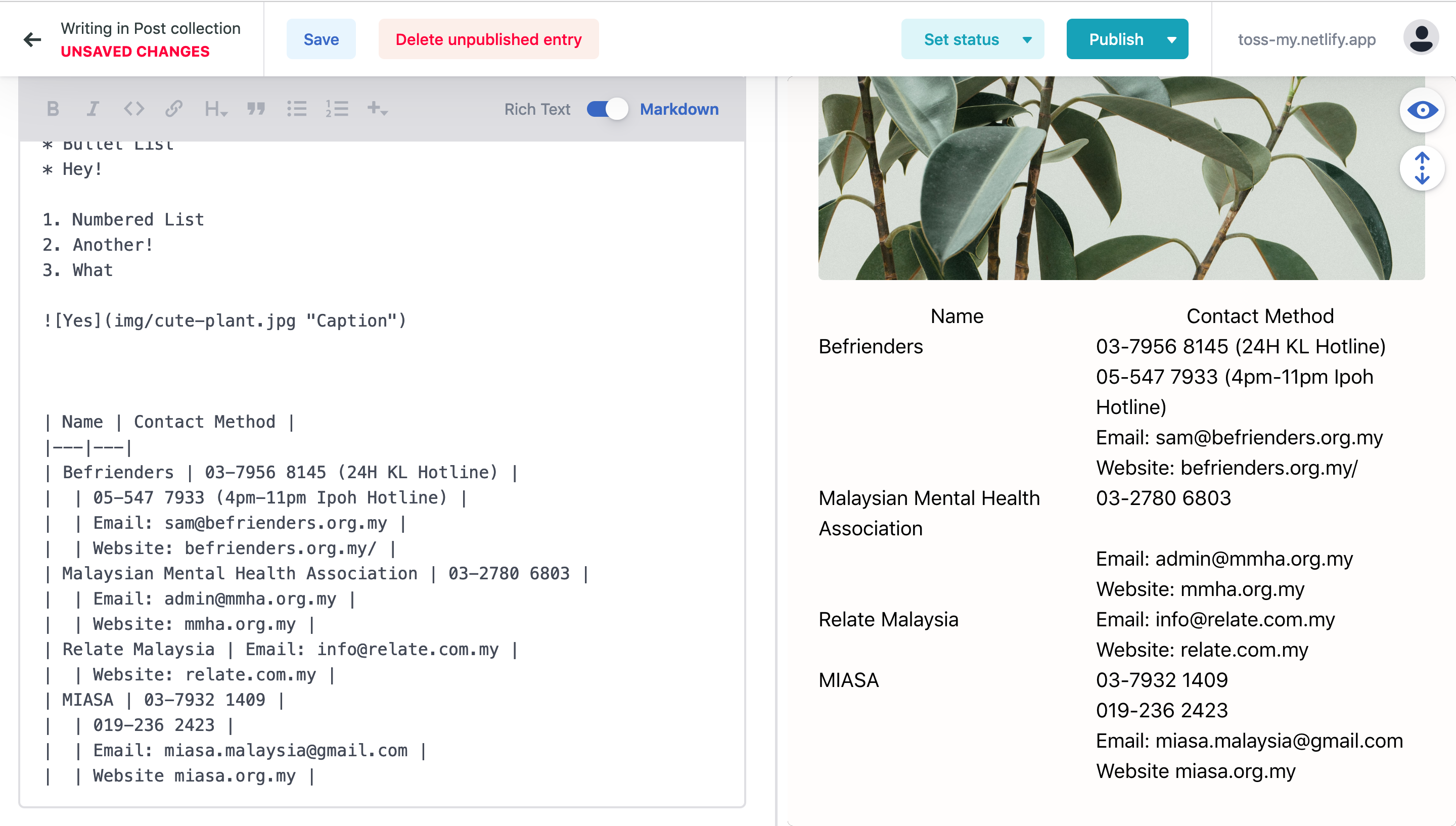
Don’t be surprised if the preview looks a little weird. (See Figure 3.1).
FIGURE 3.1 ↓
Callout Box
Make your text stand out in a box, notion-style!! This is very similar to HTML:
Code:
{{<callout>}} Your boxed text goes here {{</callout>}}
Result:
[edit 20/11/2021: this feature is buggy af. don’t use it]
Citations
Add handy references to your writing. All reference sources automatically show up on the footer of the page regardless of where they are. Hint: the thing that separates the link from the reference is the colon (:). Now click those superscript numbers and be teleported to the footer!
Code:
Maybe The Real Treasure Was the Friends We Made Along the Way.[^1]
[^1]:Know Your Meme, 2008. https://knowyourmeme.com/memes/maybe-the-real-treasure-was-the-friends-we-made-along-the-way

Never Gonna Give You Up.[^2]
[^2]:Rick Astley, 1987. https://www.youtube.com/watch?v=dQw4w9WgXcQ

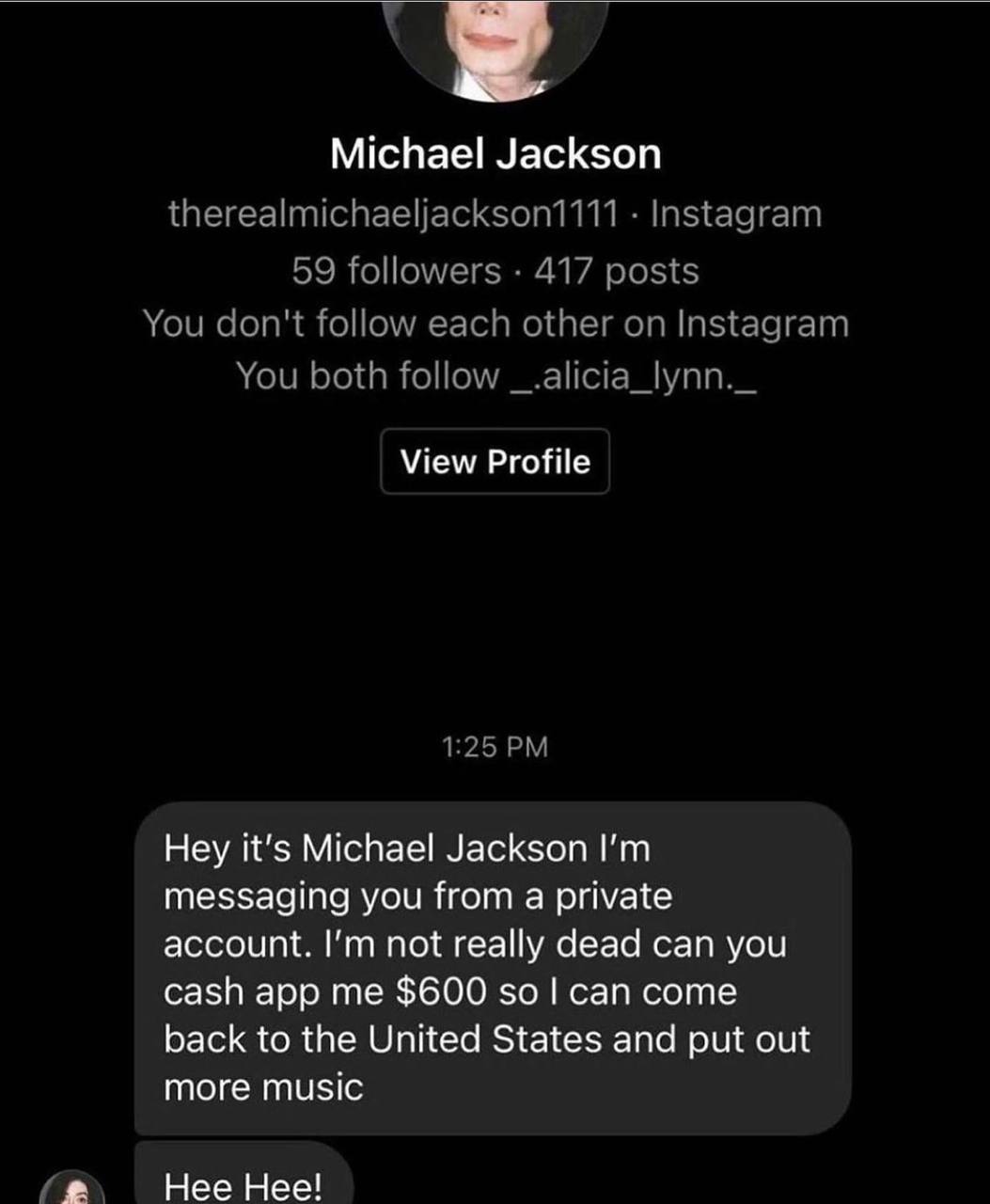
> *"Hey it's Michael Jackson I'm messaging you from a private account. I'm not really dead can you cash app me $600 so I can come back to the United States and put out more music"* [^3]

> *Hee Hee!* [^3]
[^3]:Some random Instagram Screenshot [here](../hidden/mjfake.jpeg)
Result:
Maybe The Real Treasure Was the Friends We Made Along the Way.1
Never Gonna Give You Up.2
“Hey it’s Michael Jackson I’m messaging you from a private account. I’m not really dead can you cash app me $600 so I can come back to the United States and put out more music” 3
Hee Hee! 3
Any RAW HTML
This one is for the programmers :)
Code:
{{<rawhtml>}}
   <mark> Highlighted stuff</mark>
   <div style = 'font-family: Verdana, sans-serif'> New styles! </div>
{{</rawhtml>}}
Result:
Highlighted stuffWith Great Power Comes Great Responsibility! ⚠️ ☢️
By going into Markdown Mode, you wield immense power over the site. This means you also have a bad chance of breaking it. Please, please, please ensure that any text in the curly brackets are properly spelt and the chevrons ‘<’ and ‘>’ are pointing in the right direction etc. Otherwise, the server will refuse to update and will throw an error as shown in my server page at Figure 3.2
FIGURE 3.2 ↓
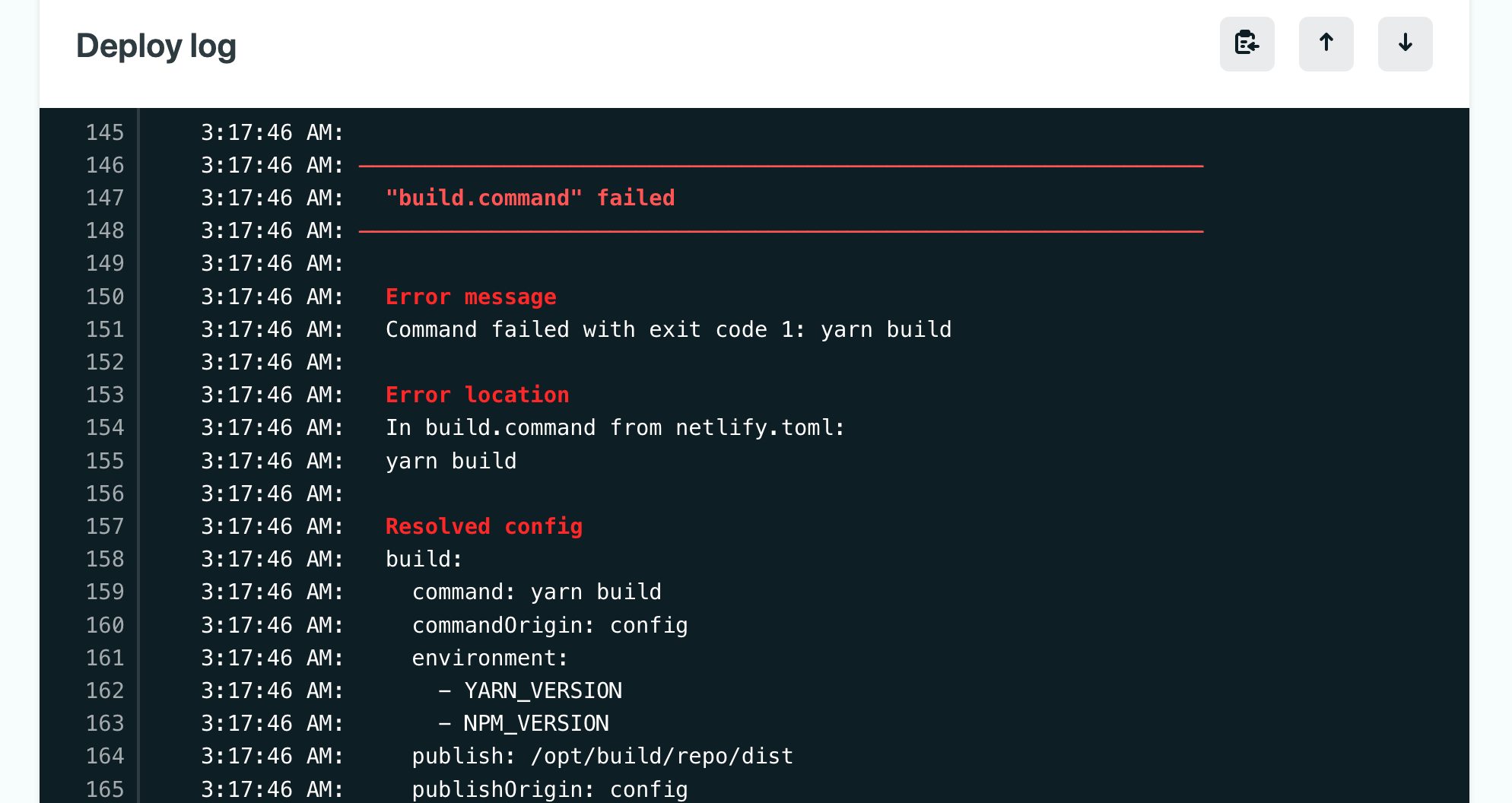
You won’t see this page, but I will; it has been the cause of my recent trauma.
It always helps to check the site a few minutes after you publish an article to make sure it shows up properly. If it doesnt, check your code again. If you still can’t find out what’s wrong, just throw your article back into ‘In Review’ status. Then ask someone more competent than you to help you fix the issue.
4. Other Pages on The Site
About Page
You can edit this page inside Netlify CMS also! Just click ‘Pages’ instead of ‘Posts’.
Archive Page
This page automatically updates itself whenever new posts are made. No need to worry about modifying this page!
Events Pages
This page shows all the posts categorised under ‘Events’ as a handy reference. There is also a public Google Calendar embedded! Right now at the time of writing, it points to a random calendar, Phases of the Moon (lol I had to pick a random one to test that it works). I will sync it with TOSS’s Google Calendar soon. The workflow idea is like this:
- The team discusses dates to hold events on, and schedules them accordingly in the Google Calendar.
- This TOSS site automatically updates its calendar for the public to view.
- Authors can announce events in more detail simply by publishing a post with under the category Events.
5. Sustainability and keeping our costs free
Every time you save a draft or publish a post, it takes around a minute for the server to rebuild and refresh the blog. Our free plan on Netlify allows for 300 build minutes per month. By the time I’m done with this website, I’d have used 35-40 build minutes on maintenance. This leaves us with 260+ minutes, equivalent to 260 actions per month. That should be pretty much enough if we’re careful with the use of the blog. Keep it in moderation!
Accessibility
As a website that focuses on mental health topics, we need to ensure our message reaches the widest audience possible. This is why I’ve made the website with high-contrast colours, spacious fonts, screen reader support and alt descriptions. I hope you can do your part too! Just fill in those alt-texts for images and we should be good.
6. Perfectionism – a brief, honest discourse
I’ll be honest with you, building this website was good fun. I’ve spent a few hundred hours tinkering away, learning so much from tutorials, forums, and videos; countless attempts finding all sorts of ways to make things work. There will always be tiny annoying issues in the code, and cool new features to implement, and beautiful dreams that will forever remain in the pipeline – but such is life without the lack of blemishes, and I don’t think I can fix too many things to make them foolproof. Reach out to me only if you find a really terrible bug or problem, which breaks the site. I haven’t found any so far. And earlier as I mentioned, I won’t be adding any more major features after this.
This isn’t goodbye though! I’ll still be around to contribute and maintain the site, it’s just that I’ll have more prioritised commitments of time to projects other than this.
Thank you for putting up with me reading through this and my other very naggy comments in the CMS fields. 🥺👉🏻👈🏻
Here’s to more!
Signing off,
Know Your Meme, 2008. https://knowyourmeme.com/memes/maybe-the-real-treasure-was-the-friends-we-made-along-the-way ↩︎
Rick Astley, 1987. https://www.youtube.com/watch?v=dQw4w9WgXcQ ↩︎